


GSE has introduced a completely renewed Help environment in the latest releases of its GSE Ink manager (GIm) software, designed to make it faster and easier for users to access the information they need.
Built on HTML5 technology, the new Help function provides context-sensitive support throughout the software. By pressing F1 on any screen, users can instantly open relevant guidance linked directly to the page they are working on, eliminating the need to search manually.
Users can also access the full Help environment via the main menu, where a redesigned welcome page allows them to browse topics and navigate the complete content structure.
Improved usability and visual guidance
The updated Help system features a clean, web-based interface and a reorganised structure with clearly defined sections such as Components, Formulas, Dispensing and Returns. This makes it easier to find information quickly and understand key workflows.
To further support usability, help pages now include software screenshots with interactive hotspots and pop-up explanations, providing clear visual guidance alongside written instructions.
While currently available in English, the browser-based format allows users to take advantage of automatic translation tools, making the content accessible in multiple languages.
The new Help functionality is now integrated into the latest GSE Ink manager releases, supporting both new and experienced users in their daily work. It will come as standard with all new equipment orders. Users with a support contract will also automatically receive the new Help feature with the latest GIm release.
“The new HTML5 Help functionality is an important step in making GSE Ink manager even more user-friendly,” said Jason Rook, GIm Product Owner. “By combining context-sensitive access, a modern web-style design, visual support through interactive screenshots, and a clearer content structure, we are helping users work more efficiently and confidently within the software.”
The updated help environment reflects GSE’s ongoing commitment to improving the user experience and supporting customers with practical, accessible tools that fit modern software expectations.
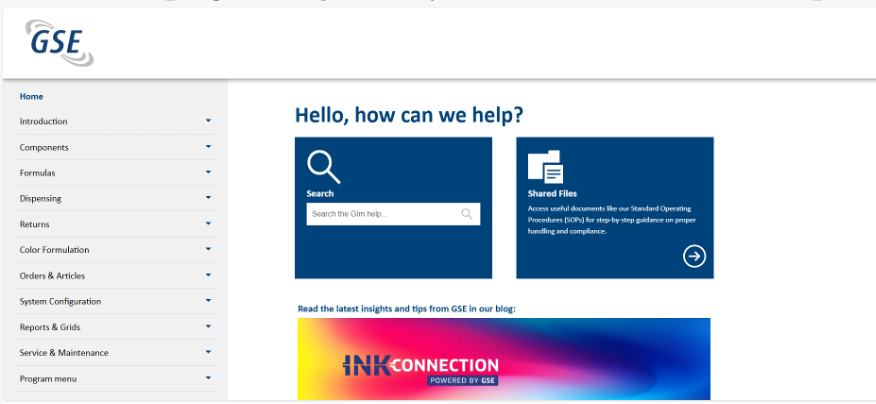
A redesigned welcome page allows users to browse topics and navigate the complete content structure.
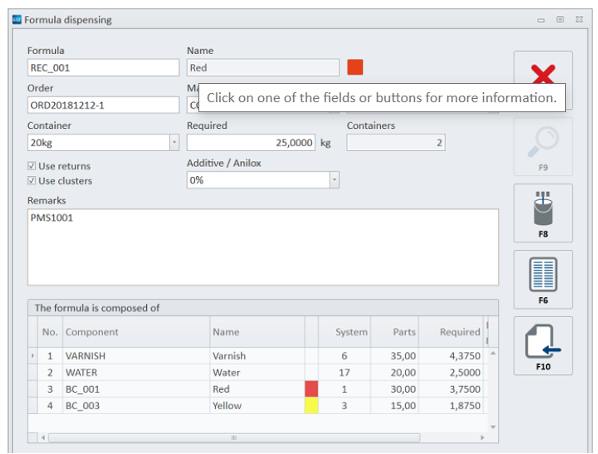
Users can instantly open relevant guidance linked directly to the page they are working on.
